Offline, on-device recognition: finish a sentence and the text lands at your cursor. Meetings produce minutes automatically — dual-track audio, clear speaker separation, minutes and to-dos organized together. The app contains no AI credits: AI runs on your own API key, while every offline feature costs nothing.
Windows 10 1809+ / 11 (64-bit) · Per-user install, no admin rights · v1.3.7 feature-parity with macOS 1.1.0
Lives in the tray; hold Right Alt to speak. A four-row candidate panel; meeting notes written while the meeting happens.
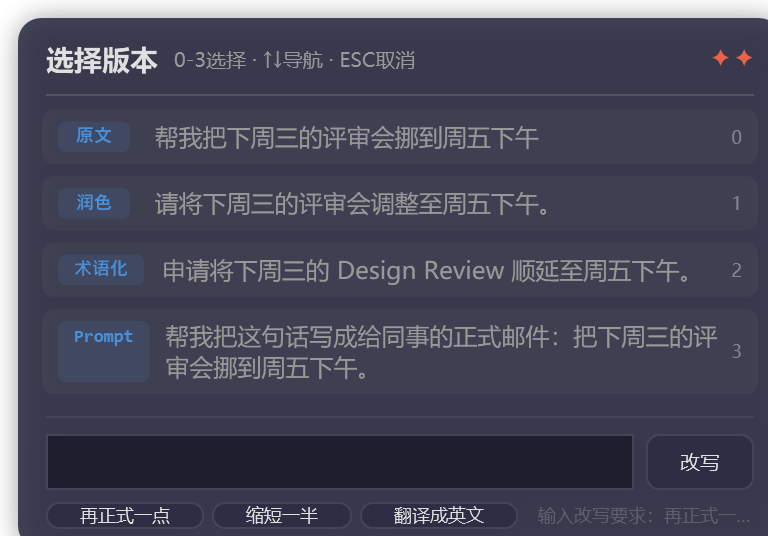
Kaikou lives in the tray; hold Right Alt and speak. When you finish, four candidate rows appear: original, AI-polished, terminology, and Prompt — arrow keys to choose, number keys for direct pick, Enter to insert.
Recognition runs offline on-device; candidates appear the moment you stop — no internet needed.
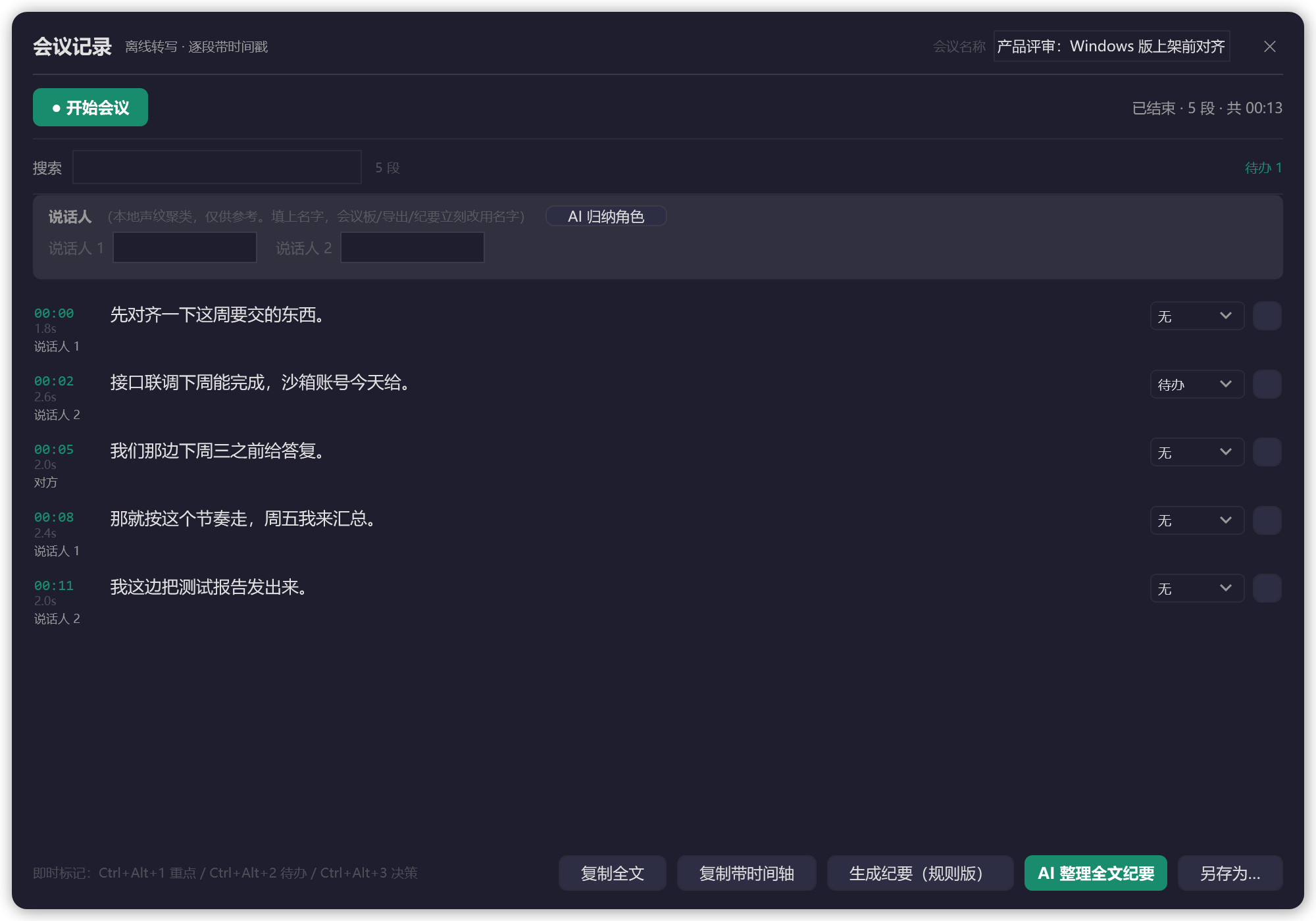
Paragraph by paragraph with timestamps and speakers; remote participants tagged separately. Mark highlights, to-dos, and decisions on any segment — after the meeting, generate a four-part minute in one click.
Export minutes to Word (.docx) / RTF / Markdown / plain text / email draft.
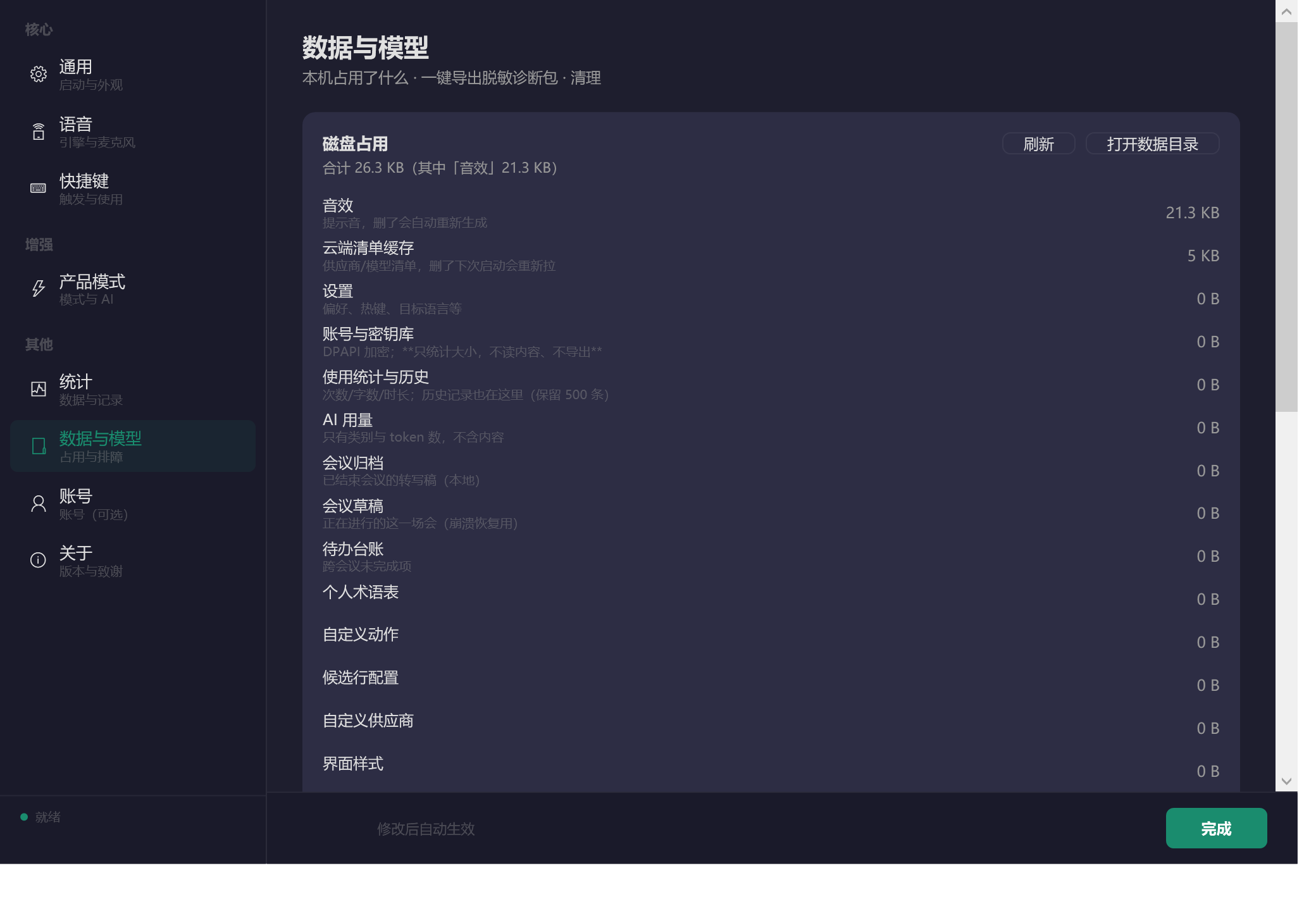
See exactly what's stored on your machine and how much space it takes; manage offline models on demand and export a sanitized diagnostics bundle in one click.
All data lives on your own computer — view and clean up anytime.
More than "speech to text": a complete on-device pipeline — capture, segmentation, speaker ID, refinement, minutes, to-dos, export.
Local, offline recognition that never breaks the meeting's flow; each sentence lands as it's finished — no waiting until the end.
Room (microphone) + online (system audio) recorded at once; remote speakers auto-tagged "Remote".
On-device voice clustering separates speakers automatically; rename them ("Engineer Zhang", "Director Li") and exports update accordingly.
When audio was recorded, Whisper re-transcribes the entire session offline in the background for a more complete, fluent transcript. The live draft stays untouched; failures stay silent.
Four-part minutes (topics / conclusions / to-dos / open items), exportable as Markdown, plain text, or an email draft; Save As supports Word (.docx) and RTF.
Tasks mentioned in meetings land in the ledger automatically; before the next meeting, unfinished items resurface on their own.
Meeting notes, to-dos, and exports all live in %APPDATA%\Kaikou; uninstalling never deletes them.
We sell no bundles, no credits, no tiers. The only thing you'll ever pay is what your AI provider bills you, by usage.
Speak → text appears at your cursor, without typing a single character. Dictation, meeting notes, and exports need no key at all.
Rheumatoid arthritis, carpal tunnel, Parkinson's tremor… when hands won't cooperate, your voice still replies, writes, and emails.
✓ Text inserts right at the cursor — no manual pasting
No pinyin, slow typing, voice messages only. Let them speak what they want to say — and send it as real text.
✓ Say it, pick a candidate, and it's sent
One-handed after a stroke, or bedridden and cared for — your voice keeps family conversations going.
✓ Dictation and meeting notes free forever, no key needed
Online and in-room meetings both need notes, minutes, and follow-ups — the Windows edition does most of that for you.
✓ Dual-track audio + speakers + minutes + task ledger
Proposals, replies, daily reports — speaking beats typing. AI polishing turns spoken language into written language, using the key you bought yourself.
✓ BYOK — providers bill you directly, by usage
Recognition runs locally; audio never uploads. Meeting records and history stay on your machine — check exactly how much space they use, anytime.
✓ Recognition engine runs 100% locally
Dictation, AI candidates, meeting notes, and data management — configure as you need.
SenseVoice on-device engine (one-time ~239MB download). Works with no internet; audio never leaves your machine.
Hold Right Alt by default; double-tap Ctrl and custom hotkeys also available. English/numbers/symbols type out directly without touching the clipboard.
Original / polished / terminology / Prompt — pick with the keyboard to replace, iterate as many rounds as you like.
Eight built-in providers (DeepSeek, Qwen, Zhipu, and more); the "Free Channels" panel in Settings links straight to providers' free-tier sign-up pages.
Fix "ling-pai" into "token" automatically; enable any of 8 dialect zones (Jiaoliao / Northeastern / Central Plains / Jianghuai / Southwestern / Wu / Cantonese / Min).
See what's using your disk, manage offline models, export a sanitized diagnostics bundle, clean logs and download leftovers.
Per-user install: no admin rights, nothing written to system folders.
| System requirements | Windows 10 1809 or later / Windows 11 (64-bit) |
|---|---|
| Installation | Double-click the installer → Next → Done. Installs to %LOCALAPPDATA%\Programs\Kaikou |
| First launch | 4-step guide: permissions → microphone test → download the offline recognition model (~239MB); skippable too |
| What if I skip the model? | Dictation and meeting notes won't work — Windows' built-in speech recognition doesn't run under .NET 8, so the offline model is a prerequisite |
| AI features | Add your own API key under Settings → Product Mode (optional; only affects AI polish/rewrite/translate) |
| Uninstall | Uninstall normally from the Control Panel; your settings, history, and meeting notes are preserved (to wipe them, delete %APPDATA%\Kaikou manually) |
| A known prompt | The installer is currently unsigned, so SmartScreen shows "Unknown publisher" — click "More info → Run anyway" to continue |
The app is free, no subscription; offline recognition, meeting notes, and exports need no key.

Run in PowerShell: Get-FileHash .\Kaikou-1.3.6-Setup-selfcontained.exe -Algorithm SHA256 and compare with the values below.
Kaikou-1.3.6-Setup-selfcontained.exe B7CA733D6FE5F4D3638D1781F07B6D1E5A0C48164FE7B771390162268A8DFE08 Kaikou-1.3.6-win-x64-selfcontained.zip 06AF85A330FC810CA75AA9D78A940122FA651FB00509015F0D392387038067C3 Kaikou-1.3.6-win-x64.zip ED82F0A94DA5374C7AF7BAFAF33DB5B4D34D11AFCF2086DF99058E795A453A31
Hashes change with every rebuild — the SHA256SUMS file shipped alongside each release is the source of truth.